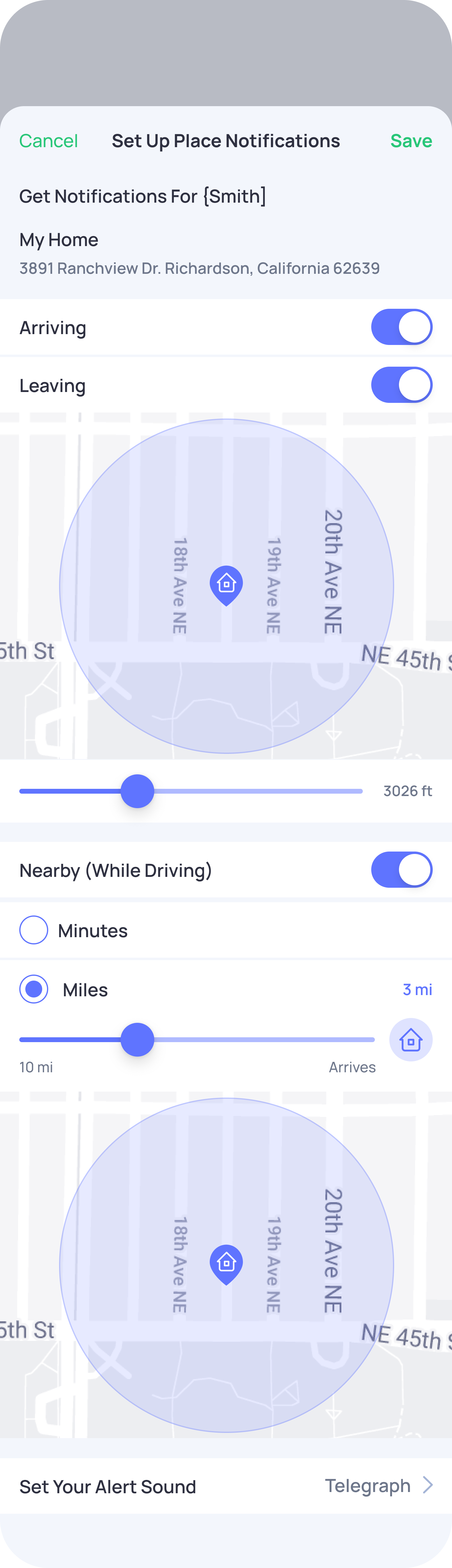
Place Alert Notifications let you know when your connection arrives at or leaves a favorite place (like Home, School, or Work, or a custom place).
You can set a zone (radius) around a place, and OtoZen will notify you based on that area.
How Arriving and Leaving alerts work
Arriving Alert
You’ll receive an alert when your connection enters the zone you set around a place.
Example:
- Zone set: 100 meters (or feet in the USA)
You’ll get notified when they enter that area.
Leaving Alert
You’ll receive an alert when your connection exits the zone.
Example:
- Zone set: 100 meters (or feet in the USA)
You’ll get notified when they leave that area.
What is the zone (radius)?
The zone is the distance around a location where alerts are triggered.
- You can adjust the radius based on your preference
- Smaller radius = more precise alerts
- Larger radius = earlier notifications
Units depend on your region:
- USA: Feet
- Other countries: Meters
Difference between Nearby (While Driving) & Arriving/Leaving Alerts:
Nearby (While Driving): Sent only when your connection is actively driving and approaching a place.
Arriving/Leaving Alerts: Sent anytime (driving or not) when your connection enters or exits the set location zone.
Note: These notifications appear only in your phone’s Notification Center and are not shown inside the OtoZen app’s Notification Center.